Sample work

Systems and pipelines I've built end to end.

These aren't commercial products — they're things I built end to end to prove I can. Each one cuts across data science, engineering, DevOps, design, and product. That's the point: not one trick, but the whole chain.

01 / 04

StatusWatch

— a signal tool for retail investors

Background

I wanted to pull in many data sources and find the connections between them. I landed on investing — easy data, and a personal stake: I'd gone in blind once and lost money.

The problem

Retail investors drown in market news and can't tell signal from noise. Most tools hand you a number and hide how they got there.

What I built

It reads the day's market news, finds the connections that matter, and turns them into a clear, explained call on each stock — showing its work, not a black box.

Under the hood

NLP sentiment analysisembeddingsknowledge graphcorrelation engineML modellingexplainabilitymulti-horizon predictionsbacktest simulatorLLM-powered Q&A (Ask SW)multi-source ingestion pipelinequeue-mode pipelinemicroservicesprompt chaining & orchestrationmodel versioning & experiment tracking (MLOps)

Notable features

  • Plain-language BUY / WATCH / HOLD call per stock, with the reasoning shown — so you're never trusting a number you can't question.
  • A "gut-check" deep dive: track record plus the drivers behind each call — so you can see whether the tool's earned your trust on that stock.
  • A simulator to test a strategy against history before you risk real money.
  • Paper trading to practice acting on the signal — no real stakes.
  • Ask questions about the data in plain English.
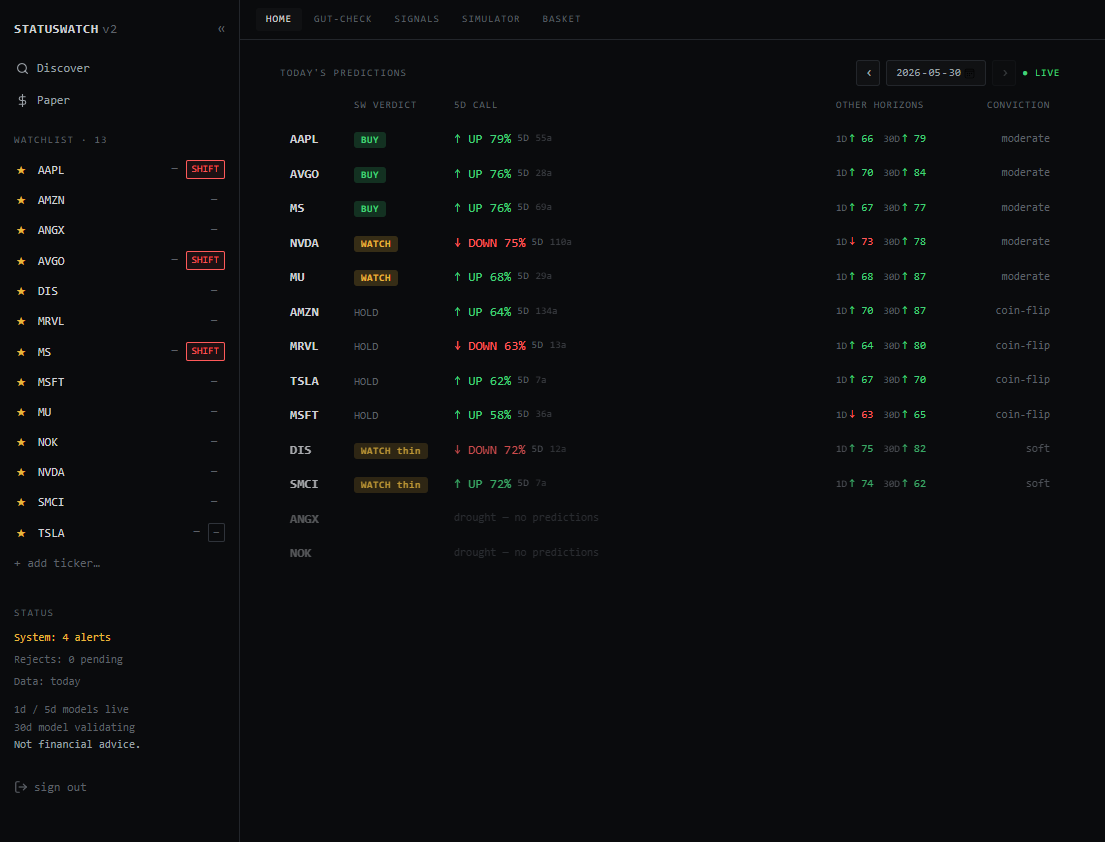
statuswatch — today's predictions
12 StatusWatch home — a watchlist of tickers with plain-language verdicts and multi-horizon predictions
  1. 1A plain-language verdict per ticker — BUY / WATCH / HOLD — not just a probability.
  2. 2Conviction and other horizons (1d / 30d) surfaced right beside the call.
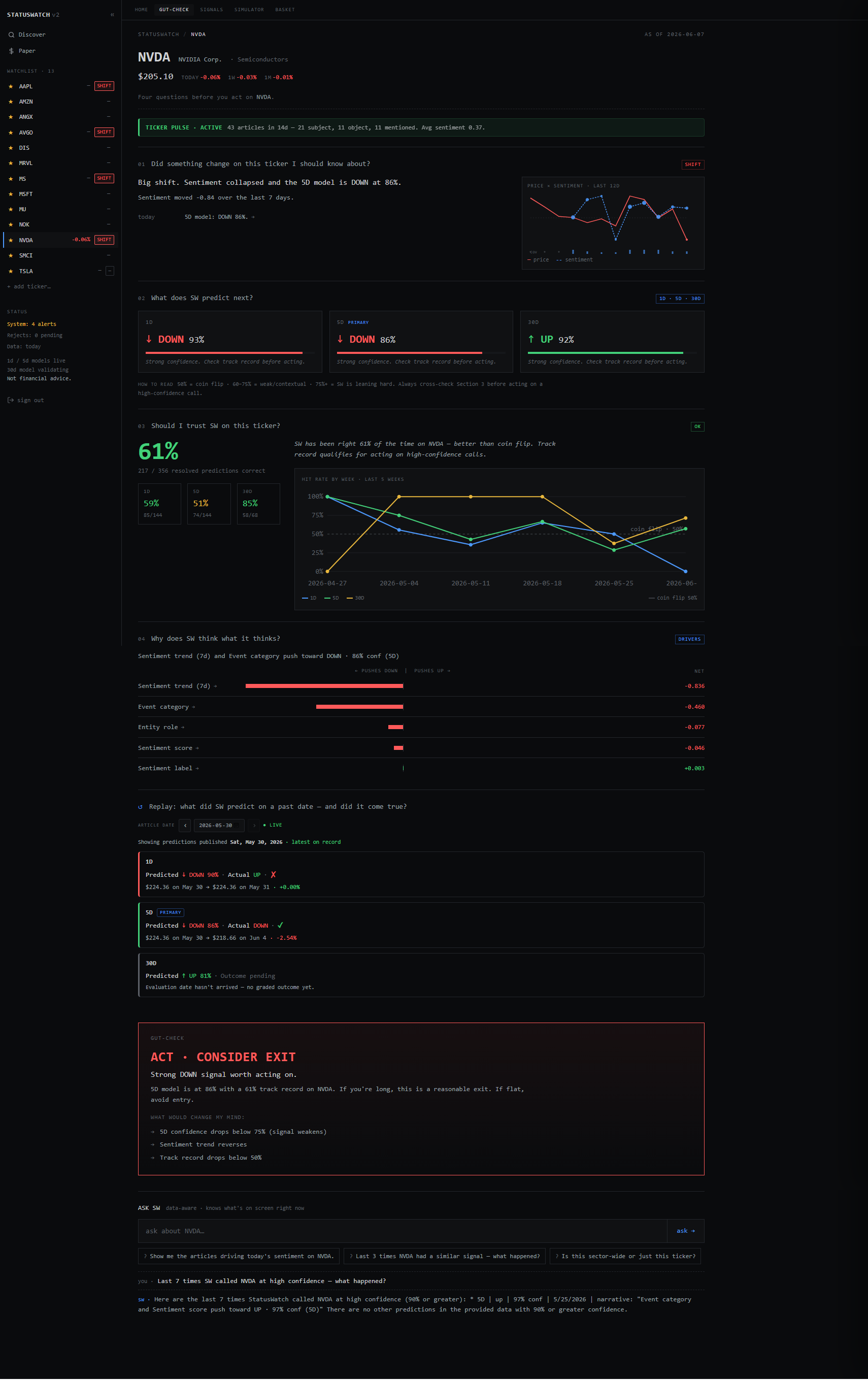
statuswatch — NVDA gut-check
StatusWatch NVDA detail — multi-horizon predictions, track record, and SHAP feature drivers single-ticker deep dive ↓

Per-ticker gut-check: predictions, track record, and the SHAP drivers behind each call.
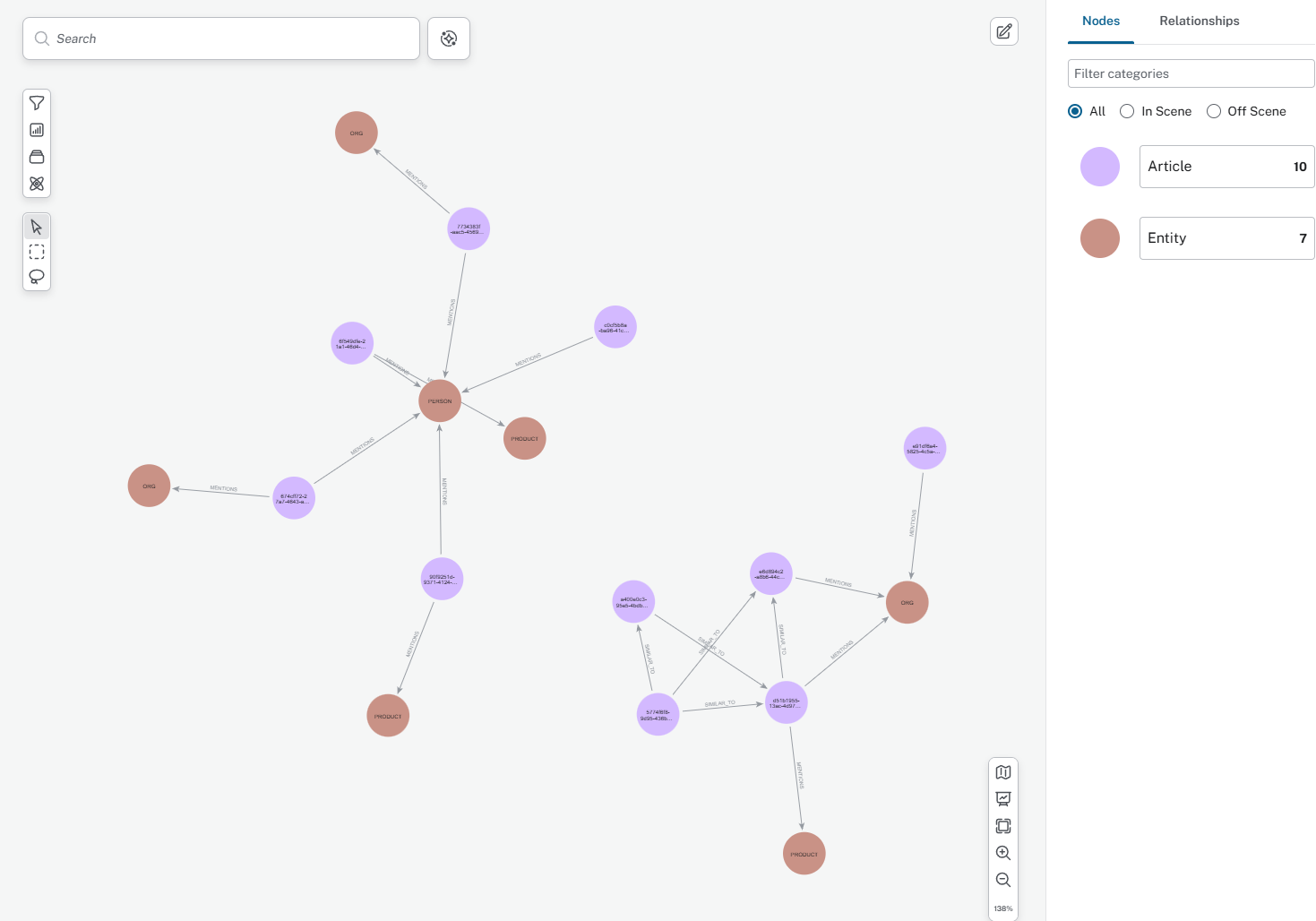
statuswatch — knowledge graph
A knowledge graph linking article nodes to the entities they mention, via MENTIONS and SIMILAR_TO relationships

Knowledge graph — entity / article relationships you can traverse, not just rows.
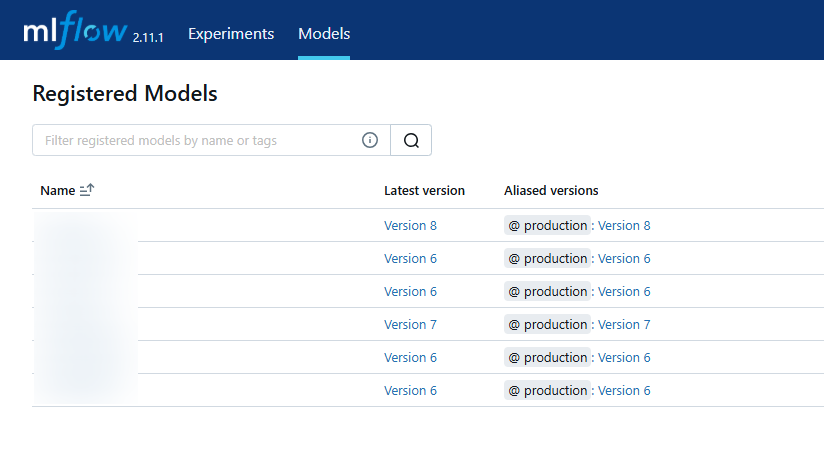
statuswatch — model registry
A model registry showing multiple model versions, each carrying a production alias

MLOps — versioned models with a production alias on the blessed version.
02 / 04

EA Assistant

— an assistant for special-education aides
ea assistant — visual schedule
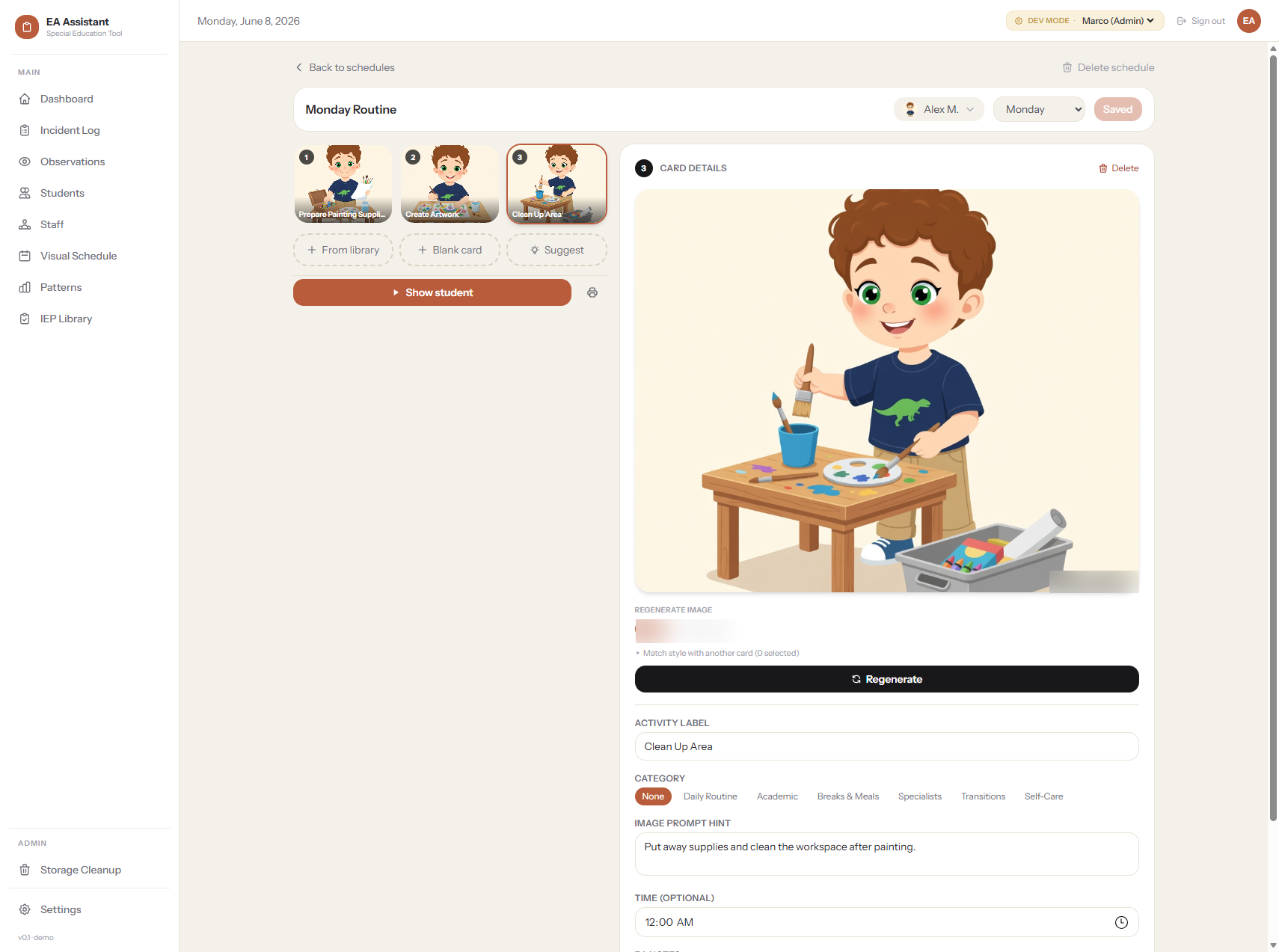
12 EA Assistant visual schedule card — the same student shown cleaning up the painting area, one card in a multi-step routine
  1. 1The same student across every card in the schedule.
  2. 2Image generation, multi-provider — a consistent character, generated per card.

Visual schedule builder — one consistent character across every card, generated per step.

ea assistant — aide dashboard
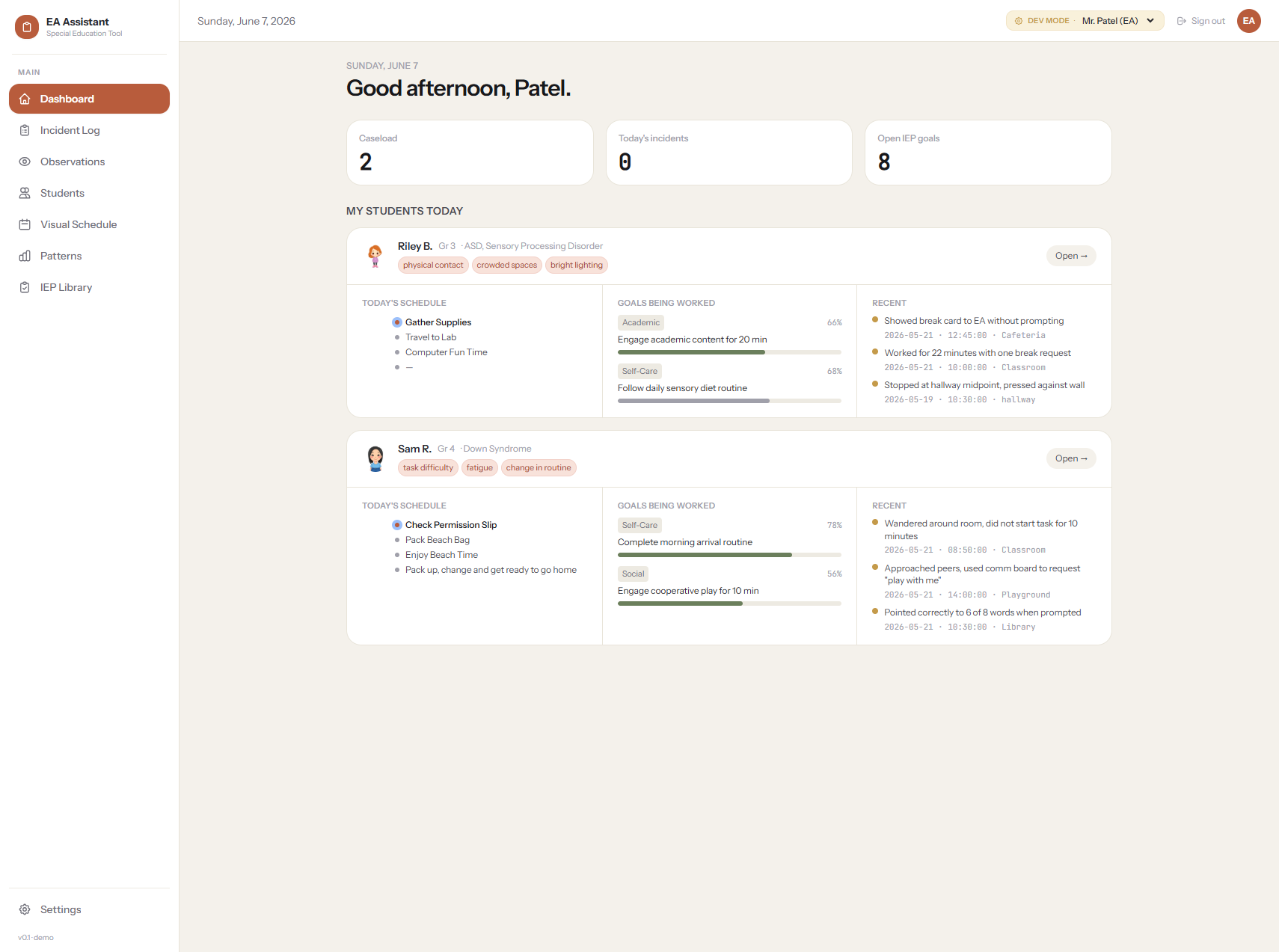
34 EA Assistant dashboard — each student's day, schedule, and IEP goals at a glance
  1. 3Caseload, today's incidents, and open IEP goals at a glance.
  2. 4Each student's daily behavior tied straight back to the IEP goals it supports.
ea assistant — patterns
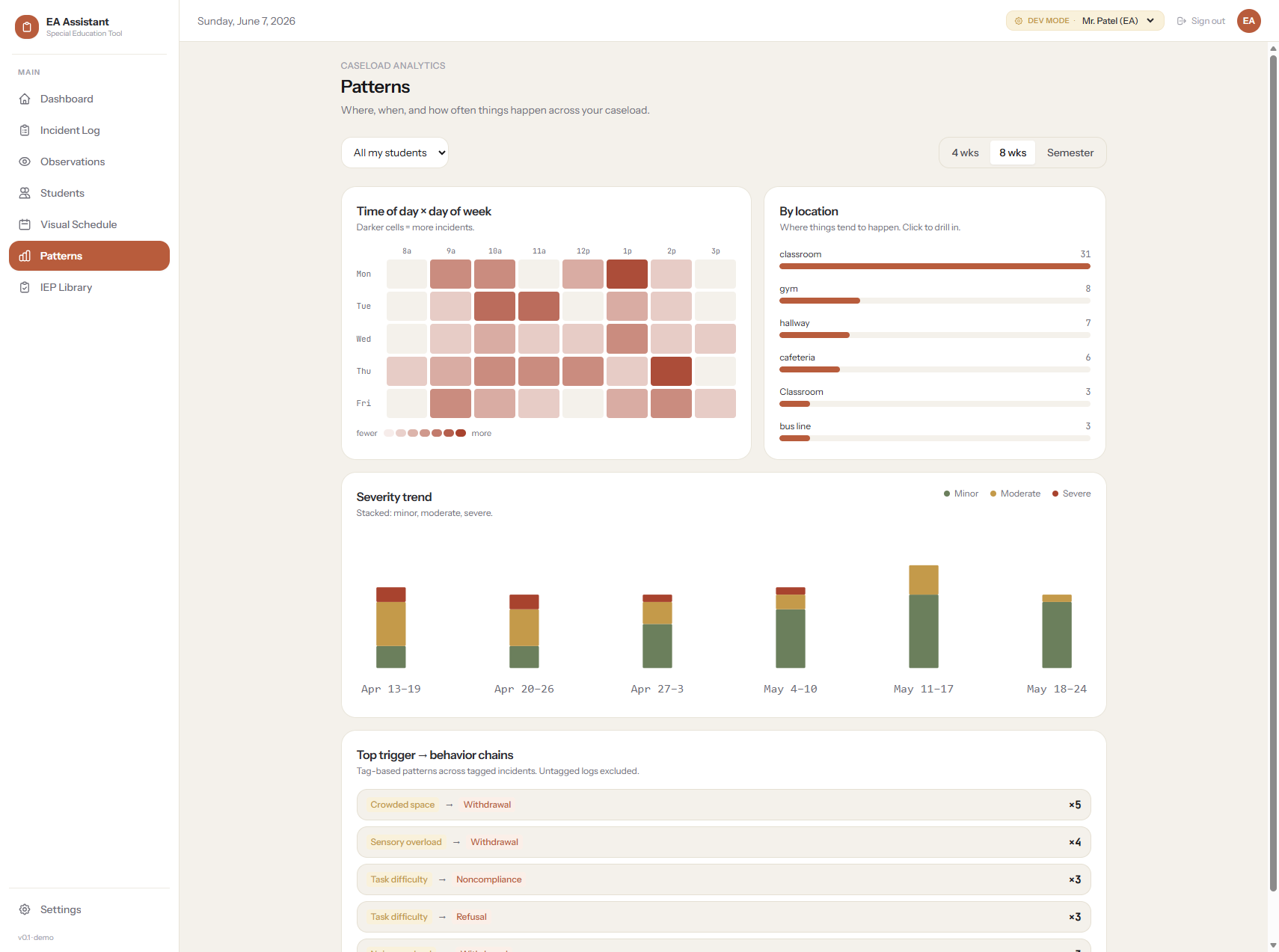
EA Assistant patterns — when, where, and how often incidents happen across a caseload

Pattern analytics across a caseload — time of day, location, severity, and trigger → behavior chains.

ea assistant — prompt library
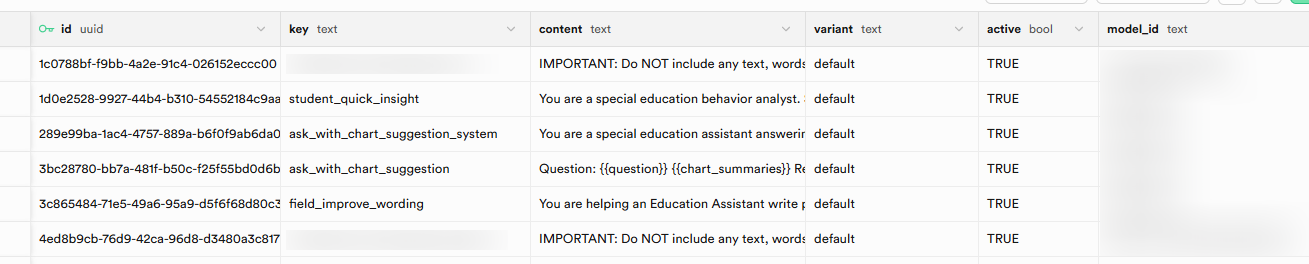
A database table of prompts with key, content, variant, active flag, and model_id columns

DB-stored prompt library — versioned, system/user variants, routed per model.

Background

It started while I was playing with image generation. Someone I know who works as an EA saw it and said they build visual schedules out of picture-cards — that became EA Assistant, for a badly underserved group.

The problem

Education assistants supporting students with individualized education programs (IEPs) juggle dense plans and daily behavior logs with tools that were never built for them — and the data is sensitive.

What I built

It helps an aide understand a student's plan and ties each day's behavior back to the goals it supports — with privacy designed in from the start.

Under the hood

image generation, multi-provider — consistency across imagesAI-assisted wording suggestionsAI voice-to-text loggingAI-suggested behavior tagsIEP extractioncaseload pattern analyticsprompt engineering, architecture & workflow

Notable features

  • Reads a student's IEP and surfaces the goals being worked — so the plan isn't just a document nobody opens.
  • Ties daily behavior logs straight to those goals — so the day's work connects to the plan.
  • Voice logging — describe an incident out loud and the fields fill in — for aides documenting after a long day, or capturing it before they forget.
  • Visual schedule builder — builds picture-card routines and generates the images — the feature that started the whole project.
  • A consistent character for each student — the child sees themselves doing each step, the same likeness across the whole schedule, generated with subject-transfer image generation.
  • Pattern analytics across a caseload — when, where, and what tends to happen — so patterns surface instead of staying buried in logs. (The same approach could help other support roles that live between a plan and the day-to-day.)
03 / 04

Shared AI Cost Tracker

— observability for my own AI spend

Background

Building across several AI providers, my spend was invisible and scattered. So I built myself a way to see it.

The problem

No clean way to see what each project, model, or piece actually costs.

What I built

A tracker for every model call across all my projects — cost by project, model, and component, down to the cent.

Under the hood

a reusable instrumentation library shared across every projecttracks both code and automated workflowsmulti-providerper-call drill-downCSV export

Notable features

  • Spend to the cent, by project / model / component — so nothing hides.
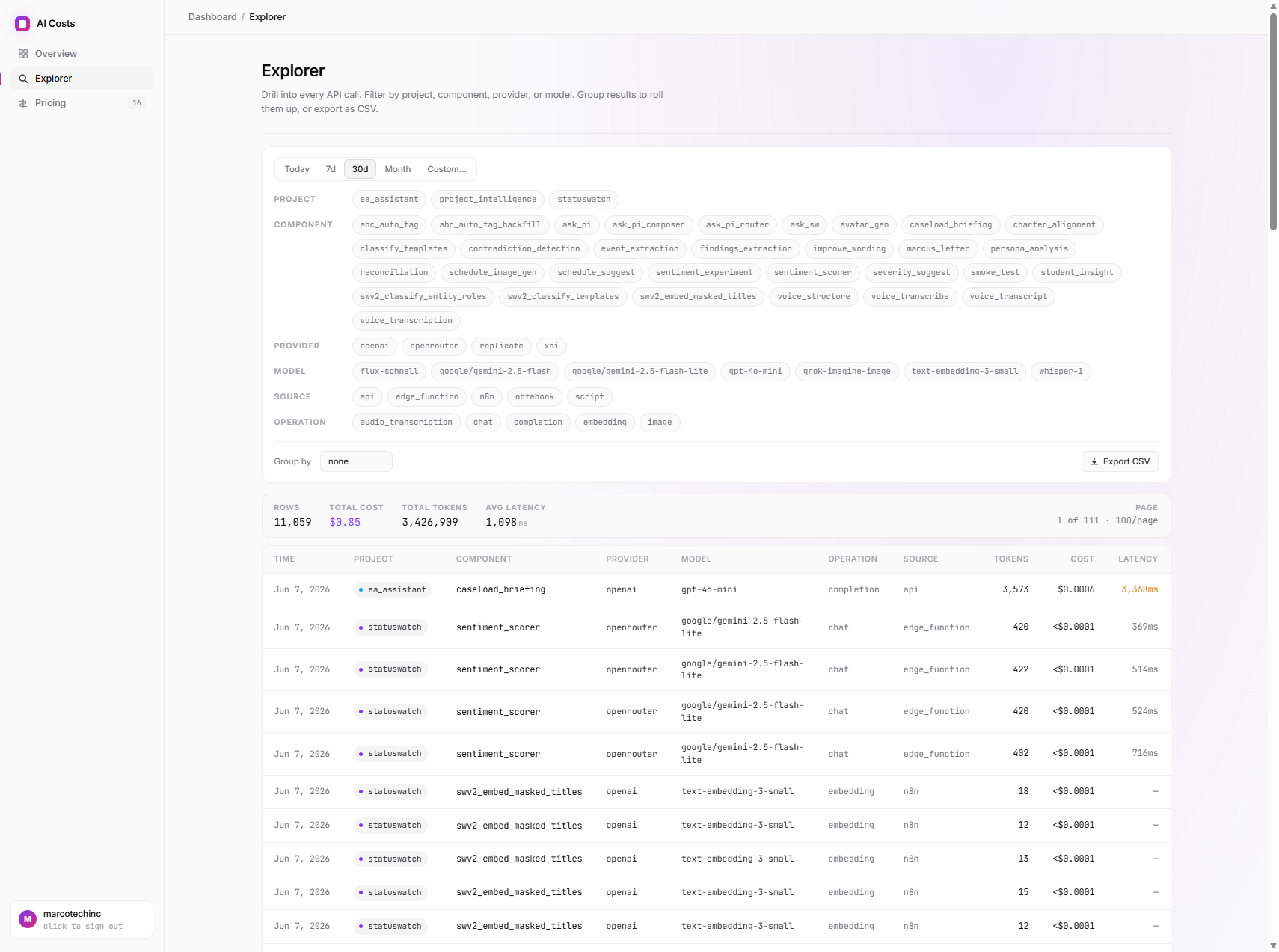
  • Drill into every single call, group and roll up — to find the expensive thing fast.
  • Covers code and automated workflows, not just one — because cost leaks in both.
  • Export to CSV.
ai costs — overview
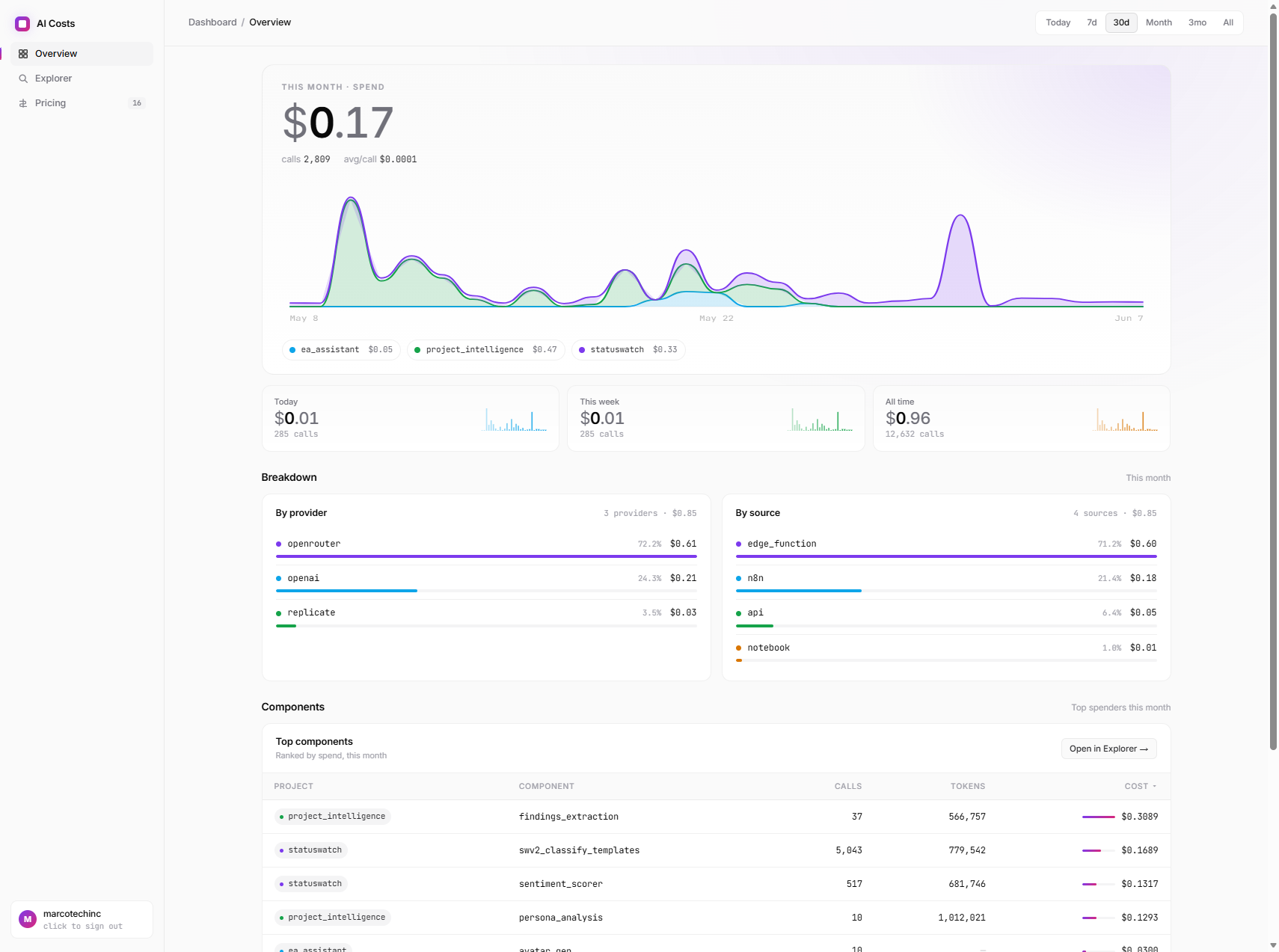
12 AI Cost Tracker overview — total spend, trend, and breakdown by provider and source
  1. 1Spend tracked to the cent, with calls and average cost-per-call.
  2. 2Breakdowns by provider, source, and component — every dollar accounted for.
ai costs — explorer
AI Cost Tracker explorer — every API call, filterable by project, component, provider, and model

Explorer: drill into every call, group to roll up, and export as CSV.

00 / 04

RAGForge

— going deep on RAG and AI agents

Background

RAGForge is where I went deep on retrieval-augmented generation and AI agents — building one by hand in n8n to really understand how the pieces fit, and to push the concepts further.

The problem

I wanted to ask questions of my own documents and get answers grounded in them — not generic model guesses. And I wanted to understand every step of how that works, not just call an API.

What I built

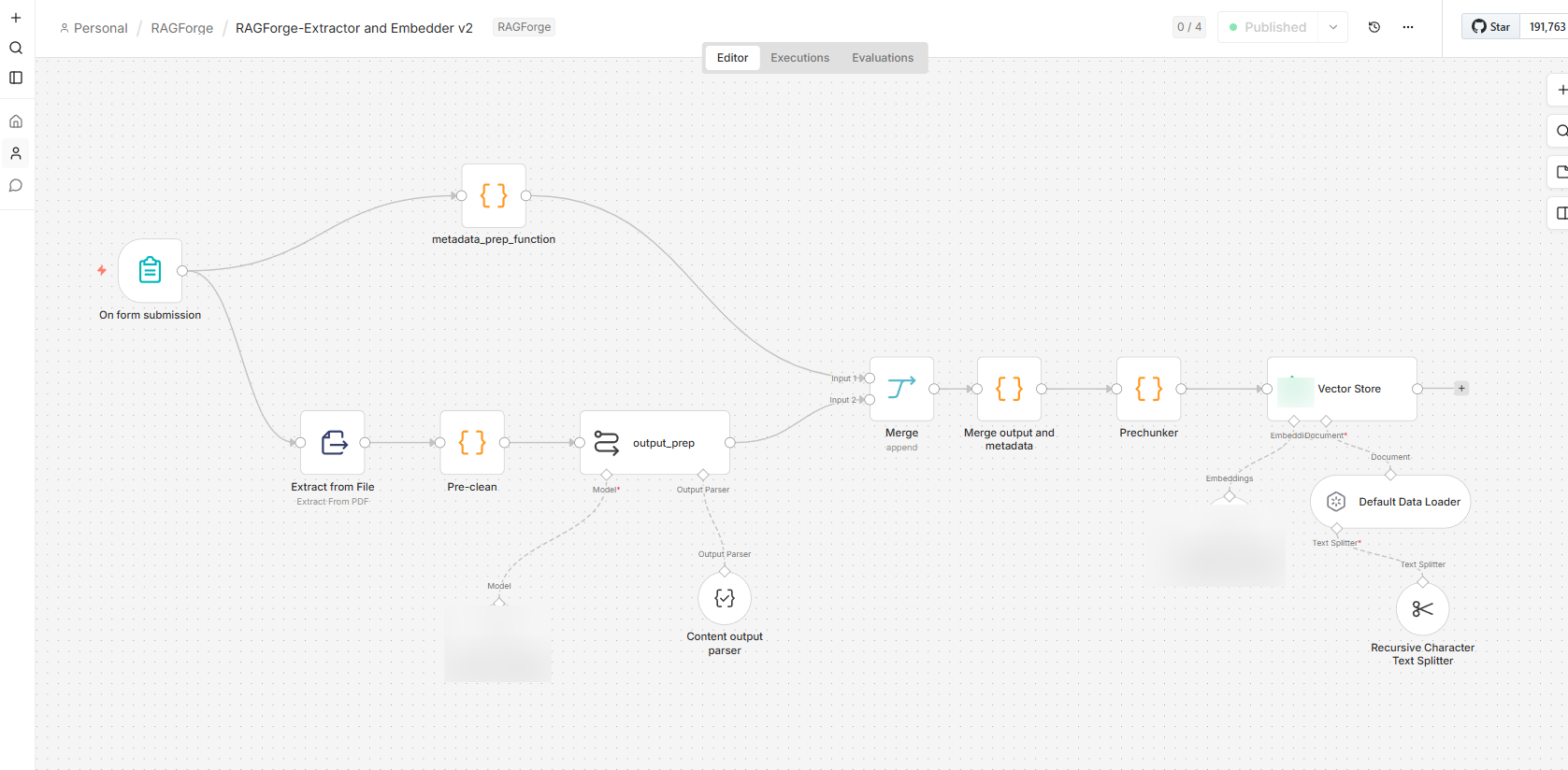
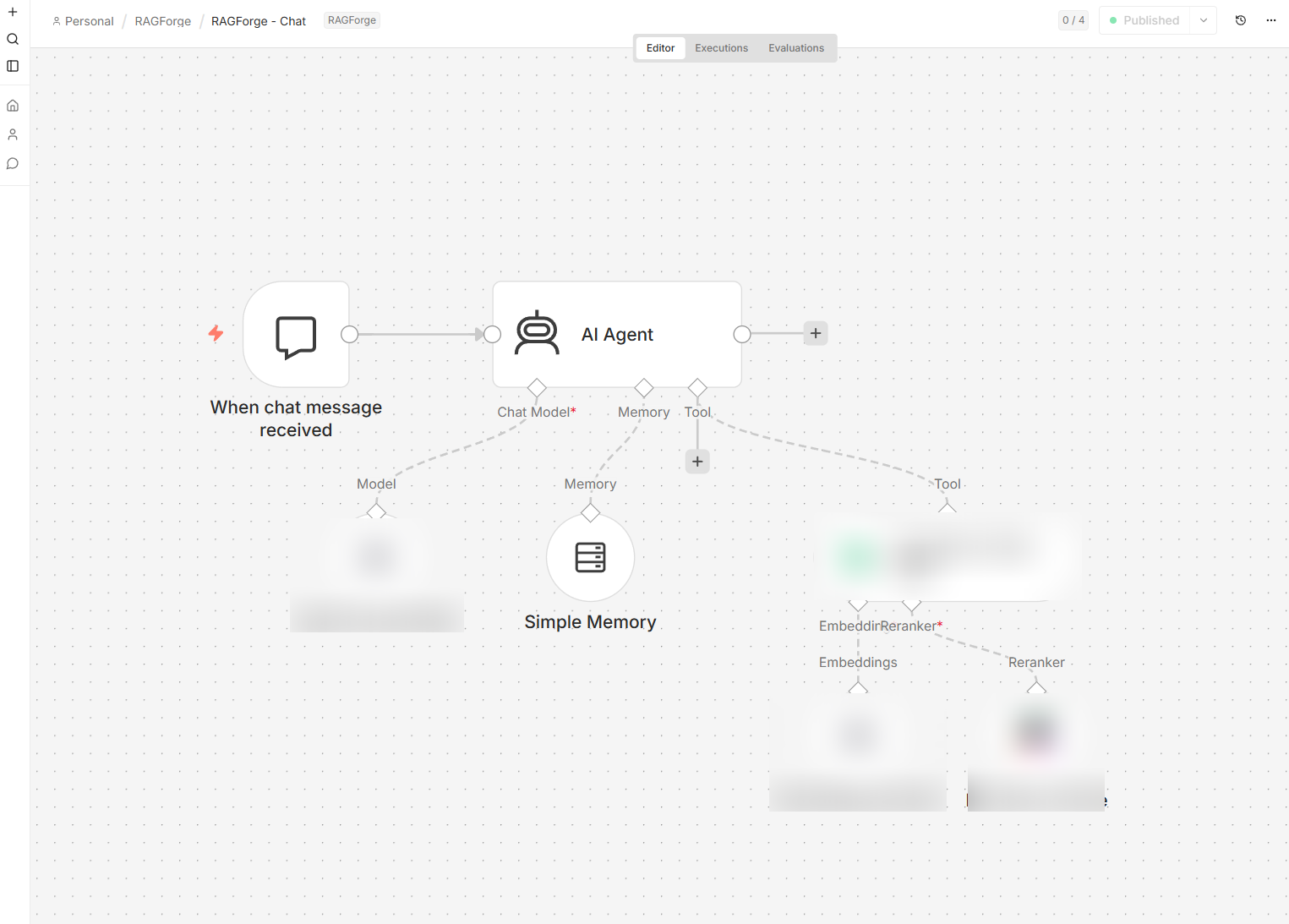
Two workflows. One ingests a document — structures it, chunks it, embeds it, stores it. The other is a chat agent that answers questions against those documents, pulling the most relevant passages first.

Under the hood

PDF extractionLLM document structuringcustom chunking with overlapembeddingsvector databasesemantic retrievalrerankingRAG chat agentprompt chainingn8n orchestration

Notable features

  • Upload a PDF and ask about it in plain English.
  • Two-stage retrieval — vector search, then a reranker, so the best passages win.
  • A structuring pass before chunking, so chunks follow real sections instead of blind splits.
  • Metadata-aware retrieval — every chunk carries title, author, type, and year, so answers can be filtered by them, not just matched on similarity.
  • Built entirely in n8n — orchestration, LLM calls, embeddings, and the vector store wired by hand.
ragforge — ingest workflow
An n8n workflow that ingests a document, structures and chunks it, then embeds the chunks into a vector store

The ingest side — a document structured, chunked, embedded, and stored.

ragforge — chat agent
An n8n workflow for a chat agent that retrieves the most relevant passages from the stored documents and answers questions against them

The chat side — an agent that retrieves and answers.

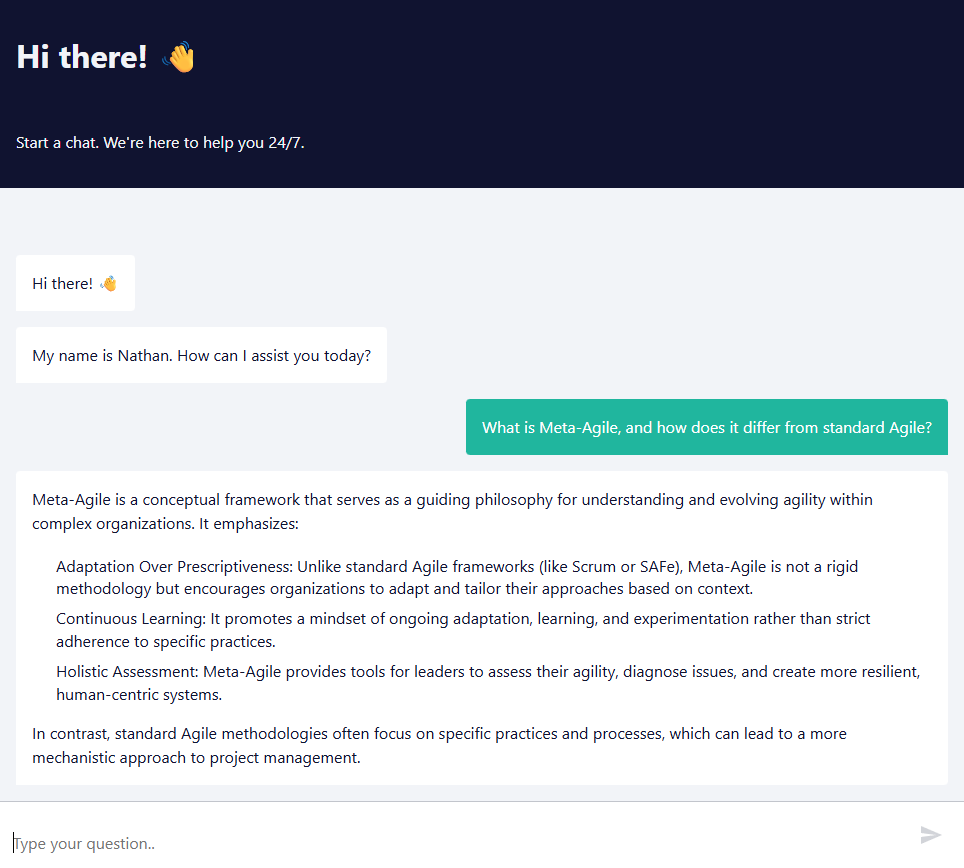
ragforge — chat
The RAGForge chat answering a question, with a grounded answer drawn from the ingested documents

Ask a question, get a grounded answer pulled from the ingested docs.

Still building. Some of these are active, some are where I started — check back as I ship.